My contact list is not showing on my Facebook page. Then a woman called with the same problem. Normally here is what I would suggest when a Facebook page or any other web page that doesn’t display properly.
None of these worked this time. I think I know why. Some research online suggested this was on purpose for some change they are making to the interface. If that is the case, you can still access your contacts.
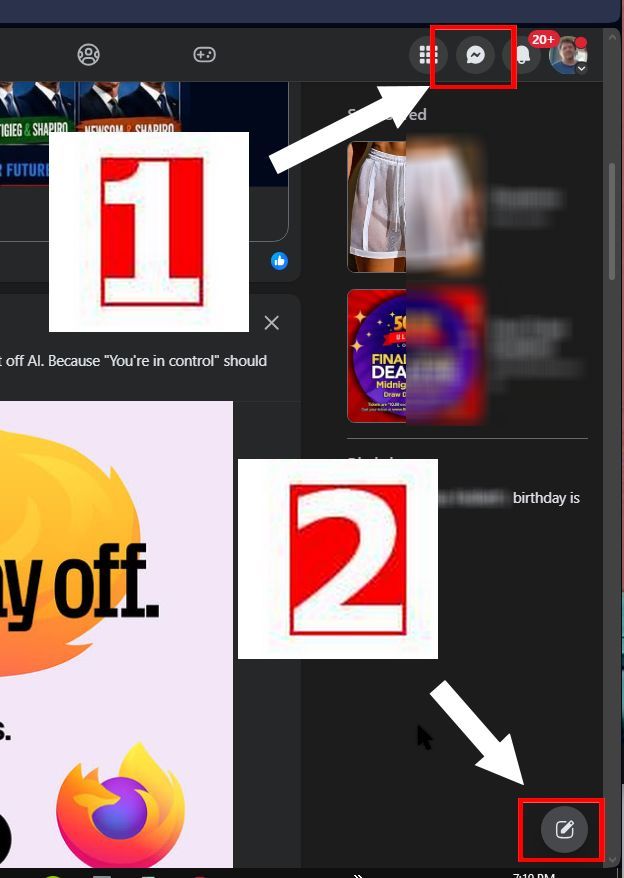
1. The first way is to click the “Messenger” button towards the top right-hand corner of the page. This opens your contacts list.
2. Down in the right-hand corner is a symbol. Looks like a pencil on a square pad. That will also show you your contacts.
The only thing is that they don’t remain open in the background like they use to. When Facebook rolls out some new changes, not everyone receives them. My sister got hit with the top menus switching to the side of the page. Mine didn’t.
Note: I just signed in to Facebook on my Linux Mint laptop using Firefox and I get the same screen as on my Windows computer.