I deleted a shared folder but it still shows up in your Network settings. I had a hard drive that I removed from one of my computers that was labelled drive E. The drive is gone but the E letter still displays in the network settings.
When I tried to remove the “E share”, it claimed it couldn't find the resource. That's why I was trying to remove it.
Sometimes you have to remove these through the registry. To remove these shares through the registry do the following. In search type: Registry Editor
Click on it when in shows in the menu. Accept any security prompts.
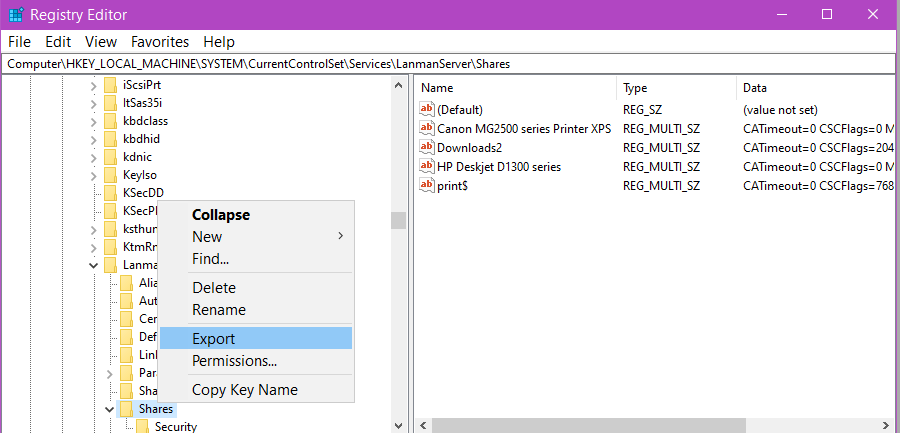
Be careful what you do here. Backup up the registration key by right-clicking on the key and select Export. Save it somewhere on your hard drive for backup.
Navigate to the following key:
HKEY_LOCAL_MACHINE\SYSTEM\CurrentControlSet\Services\LanmanServer\Shares
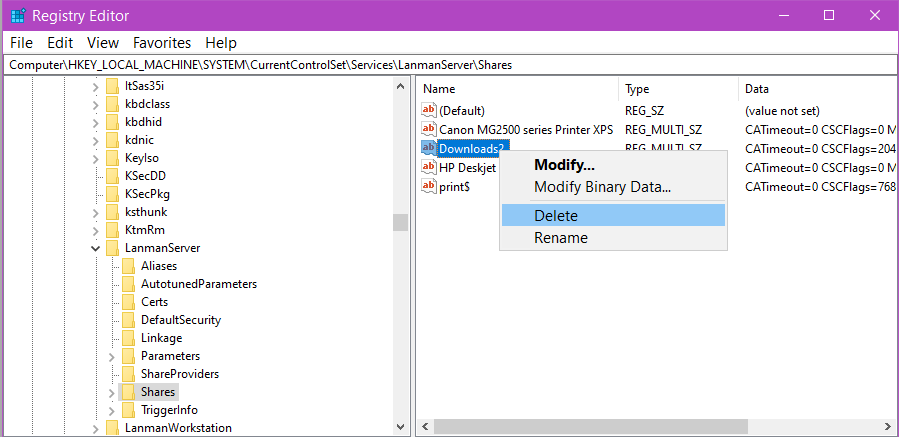
You will find a complete list of shared resources. Right click on the one you want removed and click on delete. No restart required.