I was talking to someone who had locked themselves out of their Windows account because they put in the wrong PIN number too many times.
If you get the warning that you put in the wrong PIN to many times you may see the message to put in this code "A1B2C3". Then you may be asked to put in your password.
You can also wait an hour and then attempt to log in again using your account password instead of the PIN code.
If you have to reset the instructions are here. https://answers.microsoft.com/en-us/windows/forum/all/youve-entered-an-incorrect-pin-too-many-times/46eab1a5-2338-486a-b811-dc8b4dc1a3db
I’m going to assume you got back into your account and you no longer want to fool around with PINS or Passwords.
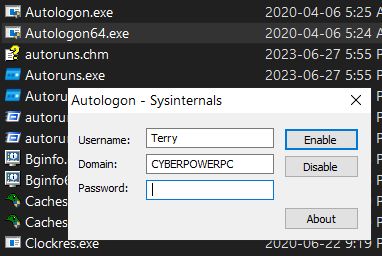
Go to this site and download “AutoLogon v3.10” https://learn.microsoft.com/en-us/sysinternals/downloads/autologon
It’s a ZIP file format. Unzip it and run “Autologon.exe” for 32bit or “Autologon64.exe” for 64bit.
Put in your account user name (your email if that is what you are using) and your password. The Domain name filled in automatically. Just the name of my computer. Now click on “Enable”. If you change your mind. Open the program. Input name and password and click on “Disable”.
No more pesky passwords or PINS.