
For personal reasons I want to make a bootable USB from a Windows 7 CD that I have. I’m going to be using a program called ImgBurn to do this.
Download ImgBurn from www.imgburn.com
I know. It hasn’t been updated in awhile but it still works. I put in my disc. Then I open up ImgBurn and click on “Create image file from disc”.
Select your source CD/DVD and give it a minute to get ready. Click on the little yellow folder icon to select where you want to save the file.

Then click on the “Read” button, the disc icons at the bottom.
Now, stare at the green progress bar until it’s finished. :-)
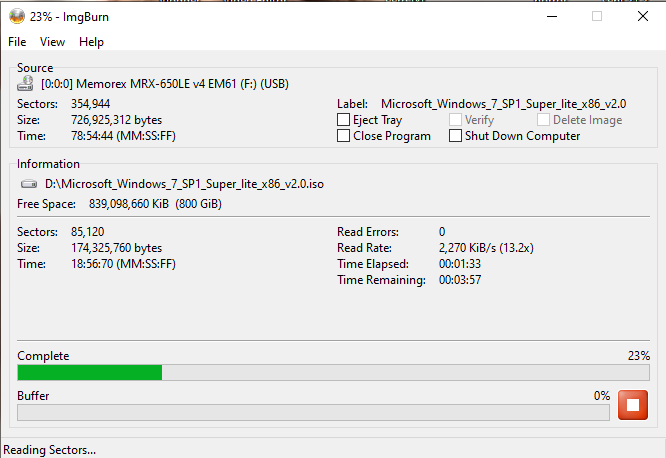
When done you will get a message that the “Operation Successfully Completed”. Your ISO will be the folder you selected.

Now use Rufus to create the bootable USB.
Download Rufus from https://rufus.ie/en/
It’s a utility for creating bootable USB flash drives. It’s simple to use. I downloaded the portable version (no installation required) and ran it. The first thing you have to do is choose your device. Mine is already selected in this screenshot.
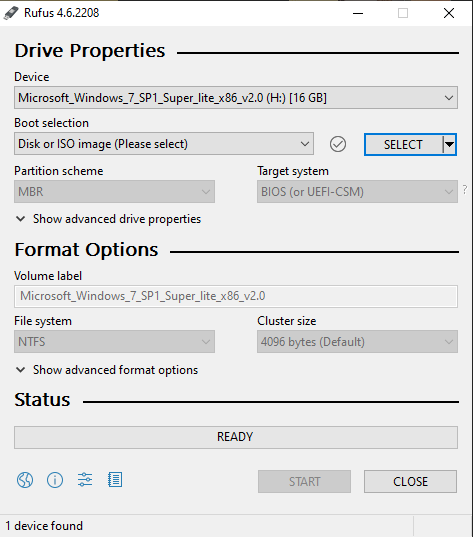
Then click on the SELECT button to choose your ISO.
You can change the Volume label, otherwise, I left all the settings as they were. Some settings like the Partition scheme and Target system, I could not change. Then just click on START.
You'll probably get some warnings, just accept. In the end you'll have a bootable USB. Boot off it to test it.